
Market-analysis workspace · Binance Spot and USD-M Futures · Private AlphaMarket-analysis workspace · Private Alpha
The market beneath the candle.
Where volume was accepted, what actually traded, and what is waiting to trade. Rendered over the same price axis as the chart.Where volume was accepted, what traded, and what is waiting to trade. Binance Spot and USD-M Futures.
Invitation onlyPublic signup is off. Invited users sign in at app.ecosystemtrading.com.
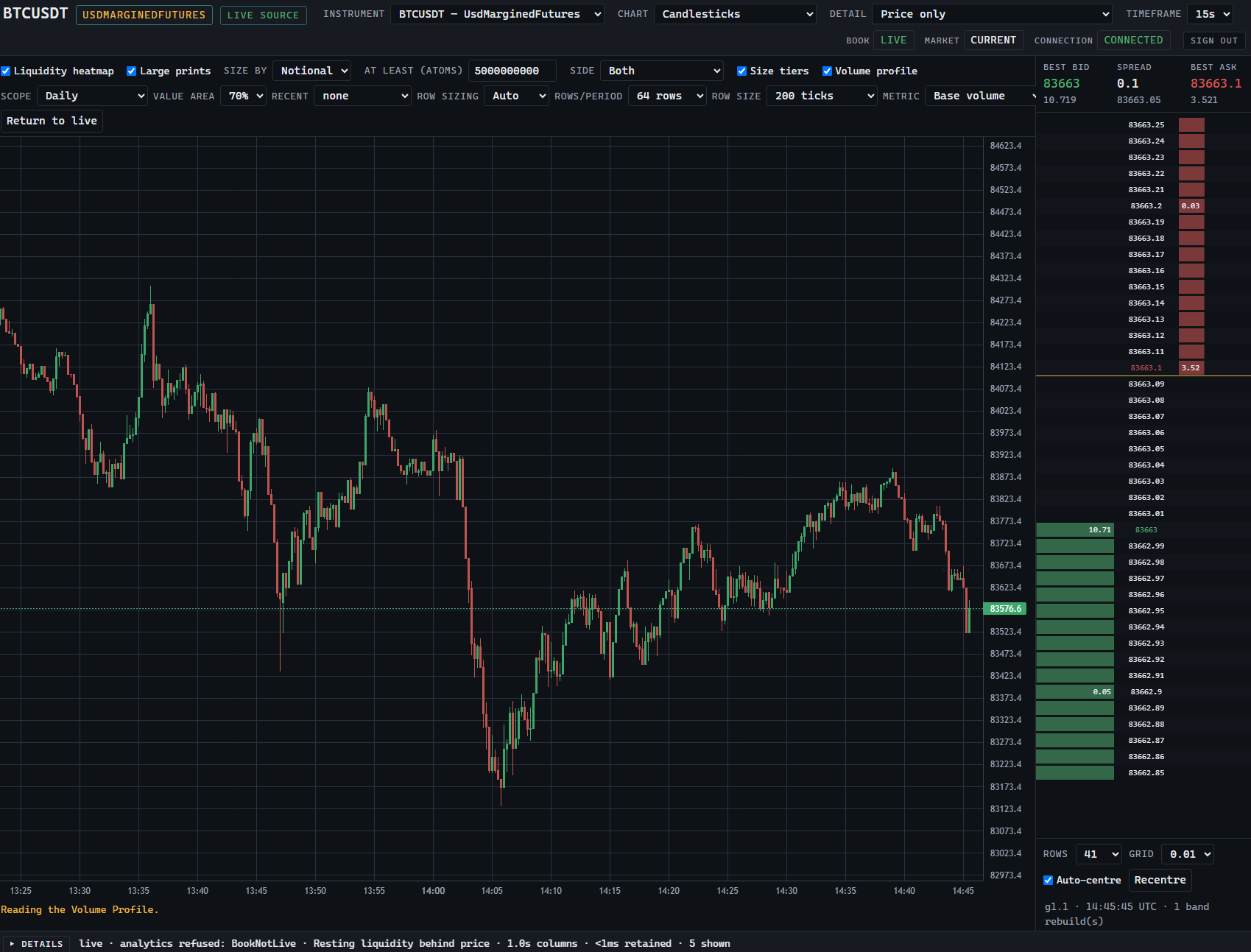
Market structure
Four layers. One price axis.
Price is the surface. Beneath it: where volume was accepted, what actually traded, and what is resting in the book. Each layer is a separate measurement of the same market, read top to bottom.Price is the surface. Read down through value, executed flow and resting liquidity.
-
01 Price
Candlesticks. Open, high, low, close per interval. The familiar surface.
Surface -
02 Value
Volume by price. Where the market accepted price and traded.
- VAH
- 83,820
- POC
- 83,760
- VAL
- 83,690
-
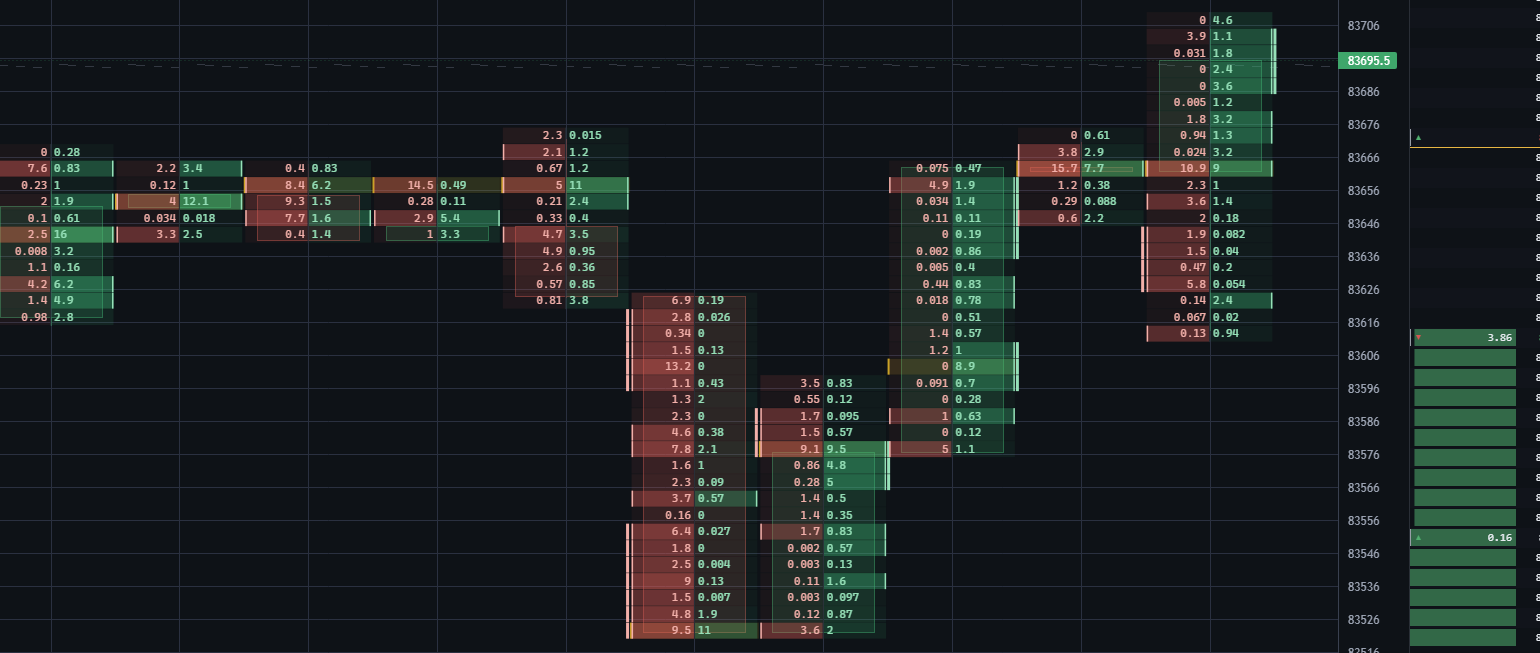
03 Executed flow
Trades that happened, split bid × ask per price level.
-
04 Resting liquidity
Orders waiting in the book, by price and over time.
Deepest layer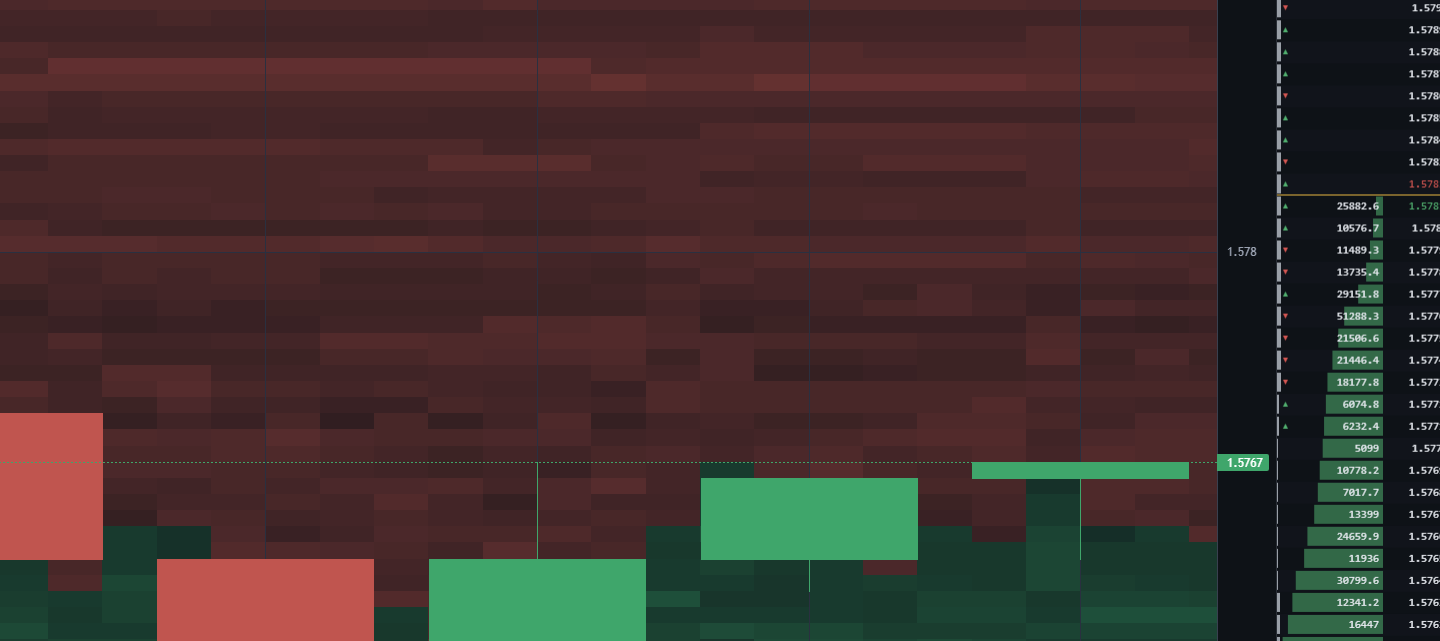
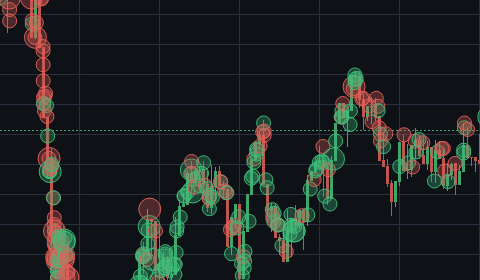
01 · 03 · 04 production screenshots · unaltered crops02 sample data · illustrative
01 · 03 · 04 production screenshots · 02 sample data
02 · Value · Volume Profile
Where the market accepted price.
Volume Profile shows participation by price. The point of control is the highest-volume level. The value area holds 70% of session volume between VAH and VAL. Measurements of the session, not targets.POC is the highest-volume level. The value area holds 70% of session volume.
Sample data · illustrative composition
- VAH
- 83,820
- POC
- 83,760
- VAL
- 83,690
03 · Executed flow · Bid × Ask footprint · Large prints03 · Executed flow · Footprint
What actually traded, per price level.
Every bar opens into its footprint: aggressive selling against aggressive buying at each price. Imbalance and absorption are marked on the cell. Large prints are drawn where they executed, sized by notional.Aggressive selling against aggressive buying at each price. Imbalance and absorption marked on the cell.
Reading a cell
- Bid
- Aggressive sell volume at the price
- Ask
- Aggressive buy volume at the price
- Imbalance
- Diagonal bid × ask ratio ≥ 300%, dominant side filled
- Absorption
- Heavy execution without price progress
- Stack
- 3 consecutive imbalanced rows
Bid · sellAsk · buyImbalance ≥300%Absorption
BTCUSDT·USD-M FuturesSnapshot
04 · Resting liquidity · Level 2 · DOM · Heatmap04 · Resting liquidity · Heatmap
What is waiting to trade, around price.
The deepest layer. Resting orders across the book, drawn as a ladder and as a heatmap over time: where size sits, where it replenishes, where it disappears.Resting size behind price, over time. Brightness is size. Bid depth below, ask depth above.
Level 2 ladder
Full-depth DOM with best bid, best ask and spread. Size per level, updated from the venue's depth stream.
Liquidity heatmap
Resting size behind price, over time. Brightness is size. Levels that vanish before price arrives are visible as gaps.
Book state
Every ladder and heatmap carries its book continuity state. When the book cannot be trusted, depth analytics are withheld.
Order-flow analysis
Four studies, computed from executed trades.
Order-flow analysis reads the trades behind each bar: which side crossed the spread, at which price, and how much traded. Each study is a measurement of what has already happened. None of them predicts price.
-
Per bar · per price
Footprint
Each bar opened into price rows. Every row shows the volume sold into the bid and bought from the ask, so imbalance and absorption are read at the price where they occurred.
-
Per bar · running total
Delta & CVD
Delta is aggressive buy volume minus aggressive sell volume within a bar. Cumulative volume delta (CVD) adds each bar's delta to a running total that restarts at 00:00 UTC and breaks at a coverage gap instead of bridging it.
-
Per period · per price
Volume Profile
Volume traded at each price over a period. The point of control is the highest-volume price; the value area holds 70% of the period's volume. A period with a hole in its coverage is marked partial.
-
Per anchor
VWAP
The volume-weighted average price since a daily, weekly or monthly anchor, drawn with a one-standard-deviation band. A period that is not fully covered is reported as partial, not estimated.
USD-M studies are computed from Binance aggregate trades. Where USD-M continuity cannot be proven, CVD and VWAP are withheld or marked partial on the panel rather than filled in.
Markets
Same instrument. Separate market truth.
Binance Spot and Binance USD-M perpetual futures are distinct books with distinct flow and distinct integrity guarantees. The workspace analyses each on its own and never merges them into one feed.Binance Spot and USD-M perpetual futures, analysed separately and never merged.
Binance Spot
Spot- Order book
- Own Level 2 stream · own DOM · own heatmap
- Executed flow
- Own trades · own footprint · own large prints
- Value
- Profile computed from Spot volume only
- Book continuity
- Verifiable when intactSequence-verified while coverage holds; fails closed on a gap
Own book, own trades, own profile.
ContinuityVerifiable when intact
Binance USD-M Futures
USD-M- Order book
- Own Level 2 stream · own DOM · own heatmap
- Executed flow
- Own trades · own footprint · own large prints
- Value
- Profile computed from Futures volume only
- Book continuity
- Unproven by designNot provable from source semantics; stated on every panel
Own book, own trades, own profile.
ContinuityUnproven by design
Current production universe
5 instruments × 2 venues · 10 separate markets- BTCSpot · USD-M
- ETHSpot · USD-M
- SOLSpot · USD-M
- LINKSpot · USD-M
- XRPSpot · USD-M
USDT-quoted. USD-M markets are perpetual contracts. Additional instruments meet the same integrity requirements before they are added.
Current universe · 5 × 2 venues
- BTCSpot·USD-M
- ETHSpot·USD-M
- SOLSpot·USD-M
- LINKSpot·USD-M
- XRPSpot·USD-M
- V2 Advanced
- BTCUSDT · ETHUSDT · SOLUSDT · LINKUSDT · XRPUSDTBinance Spot and USD-M perpetuals
- V1 Original
- Early accessFor invited accounts; some original features not yet available
Data integrity
When continuity cannot be proven, the platform says so.
Every analytical panel carries a data-trust state. Missing depth is not interpolated. Gaps are drawn as gaps. Analytics that depend on an unproven book are withheld rather than estimated.Missing depth is not interpolated. Gaps are drawn as gaps. Dependent analytics are withheld, not estimated.
- No fabricated continuity.
- No interpolated gaps.
- Absence renders as absence: —
Data-trust states
Shown on every panel- Trusted
- Sequence continuity verified for the range in view.Continuity verified. All analytics available.
- All analytics available.
- Partial
- Coverage is incomplete for part of the range.Coverage incomplete. Limitation stated on the panel.
- Values shown with the limitation stated on the panel.
- Unavailable
- No data for this instrument, venue or period.No data. Rendered as —.
- Rendered as —. Nothing is estimated.
- Continuity unproven
- The book sequence cannot be reconciled, or the venue provides no provable sequence.Book sequence not provable. Depth analytics withheld.
- Depth-dependent analytics are withheld. USD-M depth carries this state by design.
Workstations
The original application, and the advanced workspace.
V2 Advanced is the platform's full order-flow workspace and is the workstation invitees use today. V1 Original is the first Ecosystem Trading application, kept with its own interface; it is in early access for invited accounts. Historical Research is separate.
-
Invitation only
V2 Advanced
Full order-flow workspace
The full order-flow workstation. Footprint, Delta and CVD, VWAP with daily, weekly and monthly anchors, volume profile, large prints, the Level 2 ladder and the liquidity heatmap over one price axis.
All ten markets · Spot and USD-M · timeframes from seconds upward
app.ecosystemtrading.com/app -
Early access
V1 Original
Original application · early access for invited accounts
The original Ecosystem Trading workstation on live market data; some original features (paper account, performance, scanner) are not yet available.
Early access for invited accounts only
app.ecosystemtrading.com/v1 -
Restricted
Historical Research
Archive · read-only
A separate, read-only research archive. Access is restricted to the operator at present and is not offered to invitees: an invitation to V2 Advanced does not include it.
Not part of any invitation
history.ecosystemtrading.com
Access is by invitation.
Ecosystem Trading is operating in Private Alpha. There is no public signup. Participants receive an invitation and sign in to the workspace.No public signup. Participants receive an invitation and sign in to the workspace.
Public registration is not open, and this site has no sign-up form and no waitlist. To ask about access, write to the contact address below. Invitations are issued as capacity allows.
Help
Questions, answered plainly.
What does Ecosystem Trading do?
It draws order-flow analysis from Binance public market data: footprint, Delta and CVD, VWAP and volume profile and, in V2 Advanced, the order book and liquidity heatmap, over one price axis. It is an analysis tool. It does not place trades, hold funds or ask for exchange API keys.
What are V1 Original and V2 Advanced?
V2 Advanced is the full order-flow workspace that invitees use today: all ten markets, footprint, Delta and CVD, VWAP with daily, weekly and monthly anchors, volume profile, large prints, the Level 2 ladder and the liquidity heatmap. V1 Original is the first Ecosystem Trading application, kept with its own interface and chart tools. It is in early access for invited accounts: the original Ecosystem Trading workstation on live market data; some original features (paper account, performance, scanner) are not yet available.
Is the data in V2 Advanced live?
Yes. Charts load recent history, then keep updating from Binance public market data while the page is open, and the workspace shows when its connection is live, stale or offline. This website itself shows no market data: its images are dated screenshots, and the profiles marked sample data are illustrative.
Which markets are covered?
Ten Binance markets: BTC, ETH, SOL, LINK and XRP against USDT, each on Spot and on USD-M perpetual futures, analysed as separate markets. V2 Advanced covers all ten. Ecosystem Trading is not affiliated with, endorsed by or sponsored by Binance.
How much history is there, and what if data is missing?
The workstations hold the recent history the platform has recorded for each market; they are not a complete exchange archive, and how far back a chart reaches depends on the market and timeframe. Where data is missing the panel says so: gaps are drawn as gaps, nothing is interpolated, and analytics whose underlying trade record cannot be proven complete are withheld, with the reason shown.
Can I create an account?
Not yet. Public registration is off during the Private Alpha, and access is by invitation only. This site has no sign-up form and keeps no waitlist.
I have an invitation. Where do I sign in?
At app.ecosystemtrading.com, with the account your invitation gave you. The Sign in buttons on this page go straight there. After you sign in, the portal lists the workstations your account can open.
Can I use Historical Research?
Not at present. It is a separate, read-only research archive whose access is restricted to the operator. An invitation to V2 Advanced does not include it.
Is anything here investment advice?
No. Charts and studies describe past and current market activity. They do not predict prices, and nothing on this site or in the workstations is a recommendation to buy, sell or hold. Trading crypto assets carries a high risk of loss.
How do I get support?
Write to info@ecosystemtrading.com. Messages are read by the operator; no response time is promised during the Private Alpha. The terms of use and privacy notice for the workstations are linked from the app's sign-in page; this website's own privacy notice is linked below.
Contact and support
Talk to the operator.
For access questions, support, privacy requests and security reports during the Private Alpha. No response time is promised.